Phone-mounted AI capture hardware for phone calls, in-person conversations, mobile debriefs, and quick spoken follow-up workflows. Pocket attaches to the back of a phone, records with a physical button, then turns captured audio into transcripts, summaries, action items, and mind maps.
Important Notices
- Recording laws vary. Always confirm consent requirements in your jurisdiction and workplace before recording a phone call, meeting, or in-person conversation.
- Do not use Pocket for protected, confidential, clinical, legal, HR, student, or sensitive business content unless your organization has approved the recording, syncing, storage, transcription, and AI-processing workflow.
- Pocket is a capture and first-pass AI organization layer. You still need to verify transcript accuracy, names, dates, commitments, action items, and final wording before using the output.
- Pocket plan details, pricing, advanced AI features, export formats, and cloud history limits can change. Verify the current official Pocket page before buying for a specific workflow.
- This page contains affiliate links. PromptedWork may earn a commission if you purchase through them, at no extra cost to you.
Where It Fits
Pocket on PromptedWork
Phone-mounted AI capture hardware for phone calls, in-person conversations, mobile debriefs, and quick spoken follow-up workflows. Pocket attaches to the back of a phone, records with a physical button, then turns captured audio into transcripts, summaries, action items, and mind maps.
- +Phone calls where the next step is a follow-up email, quote recap, action list, CRM note, or internal summary
- +Mobile professionals who want a capture device physically attached to their phone instead of a separate recorder or desk dock
- +In-person conversations, walking debriefs, client calls, sales calls, and quick spoken notes that need to become structured follow-up
Start Here
Best Starting Workflows
Start with these to understand how Pocket is used on PromptedWork, then use the full workflow list below as the broader hub.
How to Turn a Phone Call Captured With Pocket Into a Clean Follow-Up Email and Action List
Use Pocket to capture a phone call, verify the transcript, and turn the conversation into a clean follow-up email plus an action list you can actually use.
How to Turn a Voicemail or Phone Call Note Into a Written Service Quote With AI
Use AI to turn rough call notes or a voice recording into a clean quote draft and customer email without retyping everything by hand.
How to Turn a Contractor Call Recording Into a Scope Confirmation Memo With NotebookLM
Upload a contractor call recording and related scope documents, then create a neutral memo that confirms agreed scope, materials, timing, pricing assumptions, and open items before approval.
On this page
What Pocket Is and What It Does
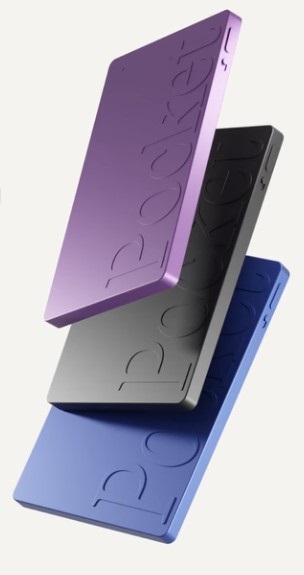
Pocket is phone-mounted AI capture hardware. Pocket's official docs describe it as living on the back of your phone, with MagSafe support and a magnetic ring adapter for phones that do not have MagSafe built in.
The current setup docs also show the basic controls clearly: a physical side button starts and stops recording, and a physical slider switches between Call mode and Conversation mode.
For PromptedWork readers, that matters because Pocket is the capture layer. It helps you catch the call, debrief, or in-person conversation while it is happening. It does not replace the later review, drafting, or approval step.
Where Pocket Fits in a Workflow
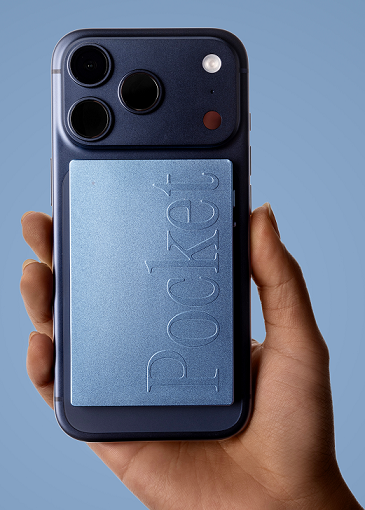
The practical workflow is simple: capture with Pocket, sync to the Pocket app or Pocket Web, review the transcript and summary, extract action items, then move verified text into ChatGPT, Claude, Gemini, NotebookLM, a CRM, or an email draft.
Pocket's official docs say recordings can sync over Bluetooth or Wi-Fi from the phone workflow, and over USB-C through Pocket Web or the desktop app when you want higher-speed transfer or bulk management.
That can reduce capture friction in mobile work, but it does not remove human review. You still need to check names, dates, promises, next steps, and anything customer-facing before you send or save it.
Phone Calls vs In-Person Conversations
Pocket separates these use cases with the physical slider. The official unboxing guide says Call mode records phone calls through the contact mic while Pocket stays attached to the phone, and Conversation mode is the setting for in-person conversations.
That mode switch matters. The current docs explicitly warn users to slide back down after a call, because leaving Call mode on can pick up extra surface noise.
The main takeaway is not that Pocket magically handles every spoken workflow. It handles two specific capture contexts in a phone-first form factor, and the operator still needs to use the right mode at the right time.
Pocket vs Plaud vs HiDock
| Tool | Best Fit | Tradeoff |
|---|---|---|
| Phone-mounted call capture, walking debriefs, and quick mobile conversation follow-up. | Best when your phone is already the center of the workflow. | |
| Plaud | Broader dedicated portable or wearable capture for meetings, site visits, and spoken notes. | More general capture hardware, less phone-mounted by design. |
| HiDock | Desk calls, phone-heavy workflows, Bluetooth-earphone workflows, and docking-station capture. | Stronger when the capture point is a desk setup or a broader call workflow. |
| Timekettle | Translation-first hardware for multilingual conversations. | Not the main choice for ordinary note capture or same-language call summaries. |
Should You Buy Pocket?
Buy Pocket if your repeated bottleneck is quickly capturing calls and mobile conversations from your phone, and you will review the transcript before sending anything downstream.
Skip Pocket if your meetings already produce approved transcripts, you cannot record the conversations you need, or your source material usually starts as clean documents, spreadsheets, or email.
This page contains affiliate links. PromptedWork may earn a commission if you purchase through them, at no extra cost to you.
Limits and Cautions
- Consent and recording law still come first. A small capture device does not change your legal or workplace obligations.
- Sensitive content needs approval. Do not use Pocket for protected, confidential, clinical, legal, HR, student, or sensitive business material unless your organization has approved the full workflow.
- Transcripts still need review. Pocket can generate transcripts, summaries, action items, and mind maps, but those outputs still need human verification.
- Plans and pricing can move. Pocket's plans, cloud behavior, export options, and advanced features can change, so verify the current official materials before buying.
- Human review stays required. Use Pocket to reduce capture friction, not to bypass judgment on names, commitments, or final wording.
Best For
Related search guides
Where Pocket fits
These pages compare this tool against adjacent workflows, task hubs, and hardware or software alternatives.
best
Best AI Tools for Meeting Notes
Choose the right AI meeting notes workflow for transcripts, documents, recurring folders, portable recorders, and desk or phone-call capture.
Open guidehardware buyer
Best AI Voice Recorder for Meetings
Compare dedicated AI voice recorder hardware for meetings, phone calls, site visits, and follow-up workflows.
Open guidePocket Workflows on PromptedWork
How to Turn a Meeting Transcript Into Minutes and Action Items With AI
The fastest reliable workflow: feed a transcript (or notes) into ChatGPT, Claude, or Gemini, extract decisions and action items with explicit uncertainty labels, then generate polished minutes and a ready-to-send follow-up email.
How to Turn a Phone Call Captured With Pocket Into a Clean Follow-Up Email and Action List
Use Pocket to capture a phone call, verify the transcript, and turn the conversation into a clean follow-up email plus an action list you can actually use.
How to Turn a Voicemail or Phone Call Note Into a Written Service Quote With AI
Use AI to turn rough call notes or a voice recording into a clean quote draft and customer email without retyping everything by hand.
How to Turn a Contractor Call Recording Into a Scope Confirmation Memo With NotebookLM
Upload a contractor call recording and related scope documents, then create a neutral memo that confirms agreed scope, materials, timing, pricing assumptions, and open items before approval.
How to Turn a Vendor Call Transcript Into Action Items and Deadlines
A fast workflow: upload or paste a vendor call transcript into ChatGPT, Claude, or Gemini, extract commitments with quotes, then produce a task list with owners, deadlines, and open questions.
Official Documentation
Last checked: May 17, 2026.