TIMEKETTLE
Translation hardware for live conversations. Timekettle helps with the conversation layer first so multilingual meetings, calls, and field interactions can be understood in the moment before you move into normal drafting and follow-up tools.
Important Notices
- Do not rely on Timekettle alone for legal, regulatory, safety-sensitive, or confidential conversations.
- Do not assume your exact language pair is supported offline just because Timekettle supports more languages online.
- W4 Pro depends on the Timekettle app on a smartphone. X1 is app-free, but online translation still depends on Wi-Fi or a phone hotspot.
Where It Fits
Timekettle on PromptedWork
Translation hardware for live conversations. Timekettle helps with the conversation layer first so multilingual meetings, calls, and field interactions can be understood in the moment before you move into normal drafting and follow-up tools.
- +Multilingual meetings, contractor calls, vendor conversations, and other spoken workflows where translation is the bottleneck
- +Users who want dedicated conversation hardware before handing usable material to ChatGPT, Claude, Gemini, or NotebookLM
- +Travel, site work, and front-desk interactions where a phone-only translation workflow feels awkward or unreliable
Timekettle at a glance
- Pick W4 Pro for meetings, calls, and the most natural back-and-forth conversation.
- Pick NEW T1 for handheld use, travel, and the strongest offline story.
- Keep X1 in mind when you need a more specialized group meeting or presentation device.
What Timekettle Is and What It Does
Timekettle makes translation hardware for live conversations. Instead of typing into a phone app, you wear interpreter earbuds or use a handheld translator so you can understand and respond across languages in real time.
Current Timekettle materials list broad online language and accent support, but offline support varies by device and language pair. Before buying, verify the exact language pair, mode, and online or offline requirement that your work depends on.
For PromptedWork readers, the practical value is simple. Timekettle helps with the conversation layer first. It helps you follow a multilingual interaction in the moment, then you still use your normal software tools afterward to write the follow-up email, memo, SOP, quote recap, or meeting summary.
Check current pricing and device options
Devices at a Glance
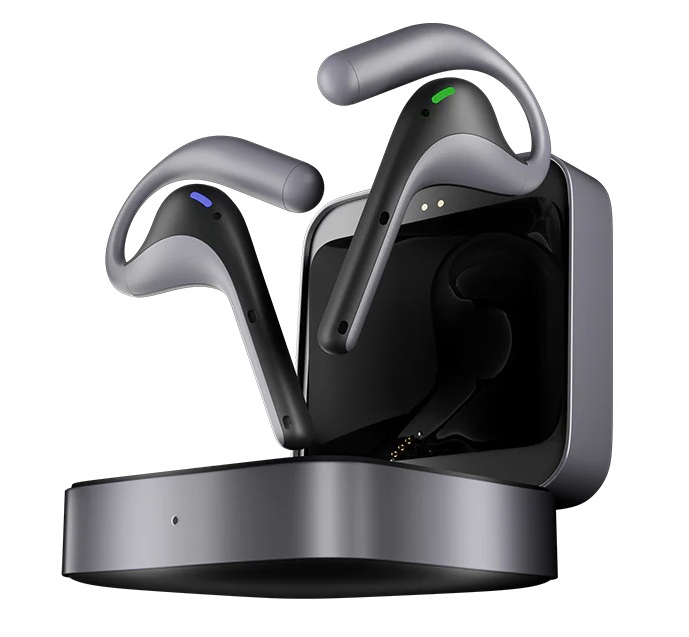
W4 Pro
W4 Pro is the clearest fit for meetings, calls, and repeated back-and-forth conversation. Current product and FAQ pages position it around one-on-one interpreting, listening, media translation, phone-call translation, and online meeting use. It needs a phone, works with iOS and Android, and runs through the Timekettle app.
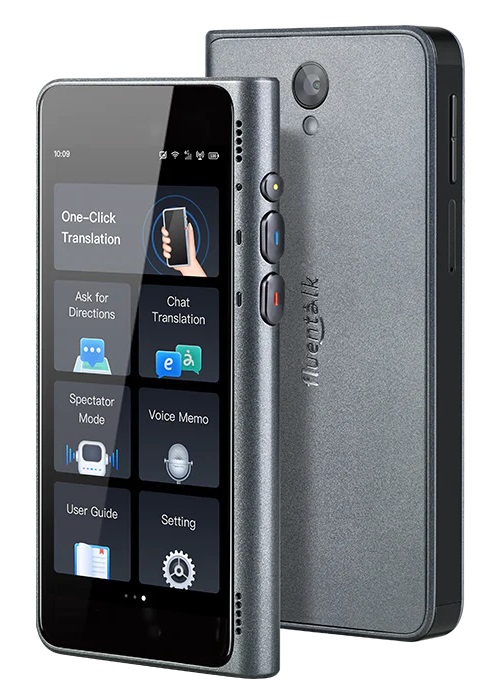
NEW T1
NEW T1 is the handheld option. Current materials position it as the strongest offline-first device in the lineup, with an on-device AI edge model, offline language packs, included data service, and photo translation. It is the better fit when you want a dedicated screen in hand, expect weaker connectivity, or care more about practical reliability than a more natural earbud conversation flow.
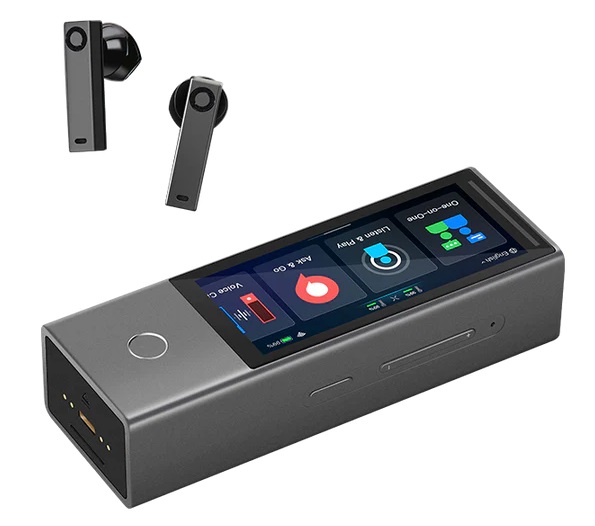
X1
X1 is the more specialized option. Current product pages position it as an app-free standalone translator for group meeting translation, one-on-one simultaneous translation, voice calls, quick travel interactions, and presentation mode. It belongs here for completeness, but for most readers it is the compare-against device, not the main recommendation.
How People Actually Use Them

W4 Pro in Use
W4 Pro is the more natural conversation device. The earbuds are worn during the interaction, and the translation workflow runs through the connected phone. It is the strongest fit when the conversation itself is the main event and you want translation to sit more quietly in the background.
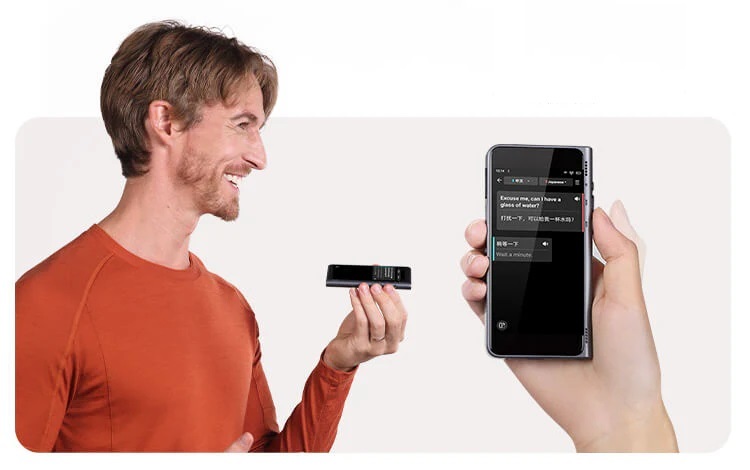
NEW T1 in Use
T1 is more explicit and screen-based. One person holds the device, speaks into it, and reads or shows the translated result on screen. That makes it less seamless than earbuds for long fluid meetings, but often more practical for travel, front-desk use, field interactions, and shorter practical exchanges.

NEW T1 for Photo Translation
T1 also makes more physical sense when the task is not just listening. If you need to point the device at signs, menus, printed instructions, or other text in the environment, the handheld format is simply a better fit than an earbud-first workflow.
X1 in Use
X1 is the meeting and presentation hub in the lineup, not the default travel pick. It is app-free and standalone, so the device itself handles the interaction instead of depending on the Timekettle phone app during the session.
The strongest X1 use case is a room where more than two people need to participate across languages. Timekettle positions it for group meeting translation, one-on-one simultaneous translation, Ask & Go quick exchanges, voice call translation, and presentation mode. In group settings, the official product materials describe multi-way interpretation for up to 5 languages and 20 people.
Presentation mode is the clearest reason to choose X1 over the simpler devices. It can support a presenter-led workflow where participants follow translated speech through the session, and Timekettle notes that the presentation QR code changes with each new talk. That makes X1 feel more like event hardware than a casual translator.
The practical caveat is connectivity. X1 is app-free, but it is not automatically offline for every mode. Timekettle's current FAQ says offline translation is available only for One-on-One and Listen & Play, so group meetings, voice calls, Ask & Go, and presentation use should be planned with a reliable network unless your exact offline mode and language pair are confirmed.
Compact Comparison
- Best for natural conversation: W4 Pro
- Best for offline resilience: NEW T1
- Best for group meetings and presentations: X1
- Phone required: W4 Pro uses the Timekettle app; X1 is app-free but online translation still needs Wi-Fi or hotspot; T1 is positioned as a standalone handheld.
- Strongest fit for travel and field use: NEW T1
- Most specialized and easiest to overbuy: X1
Online and Offline Reality Check
W4 Pro is not standalone. Current FAQs say it needs a phone, works with iOS and Android, and uses the Timekettle app.
W4 Pro is only partly offline. Offline availability depends on mode and language pair, while media translation requires internet access. Verify the current offline package list before buying for field work.
NEW T1 has the strongest offline positioning. Current product materials emphasize on-device translation and offline language packs. That makes T1 the most credible option on this page for weak or inconsistent connectivity.
X1 is app-free, but not connection-free. Current FAQs say online translation on X1 requires Wi-Fi or a phone hotspot, and offline support is mode- and language-dependent.
How Timekettle Fits on PromptedWork
PromptedWork does not currently have a separate multilingual workflow cluster. The cleanest way to think about Timekettle is as an adapter for workflows that already start with spoken input.
For example, a contractor call workflow can use Timekettle first if live translation is necessary, then follow the same recap process afterward. The hardware helps you get through the conversation. Your normal software tools still handle the final output.
Interpret first, draft later.
Limits and Realistic Expectations
Timekettle can reduce friction in a live conversation. It cannot guarantee perfect understanding. Fast speech, overlapping voices, technical jargon, noise, accents, and emotionally nuanced exchanges can still create mistakes.
T1 is usually better for practical exchanges than long, fluid, many-person conversation. W4 Pro is better when the interaction itself is the main event. X1 is broader, but also easier to overbuy if you do not actually need presentation mode or multi-person translation.
Last checked: April 11, 2026.
Best For
Related search guides
Where Timekettle fits
These pages compare this tool against adjacent workflows, task hubs, and hardware or software alternatives.