HIDOCK
Desk and phone-call capture hardware for meetings, service calls, interviews, debriefs, and recurring spoken workflows. HiDock helps capture the source conversation so you can review the transcript and hand clean material to ChatGPT, Claude, Gemini, NotebookLM, or another workflow tool.
Important Notices
- Recording laws vary. Always confirm consent requirements in your jurisdiction and workplace before recording a call, meeting, or debrief.
- Do not use HiDock for protected, confidential, clinical, legal, human resources, student, or sensitive business content unless your organization has approved the recording, transcription, and AI-processing workflow.
- HiDock helps with capture and first-pass transcription. You still need to verify the transcript, names, dates, commitments, and final output before using it.
- HiNotes plan details and advanced AI features can change. Verify the current official HiNotes plan limits before buying for a specific workflow.
On this page
What HiDock Is and What It Does
HiDock makes capture hardware for spoken workflows. That includes desk meetings, but it also includes phone-call capture when the useful information starts in a live conversation instead of a clean document or email thread.
Depending on the device, HiDock can also fit Bluetooth-earphone-based calling workflows. That matters if you want to keep the normal way you take calls while adding a dedicated capture and transcription layer underneath it.
HiDock is the capture and first-transcript layer at the beginning of the workflow, not the final writing or decision-making tool. The practical sequence is: capture with HiDock, review the material in HiNotes, then move verified source material into ChatGPT, Claude, Gemini, NotebookLM, or another tool that handles the final draft.
HiNotes is HiDock's companion software layer for reviewing recordings, accessing transcripts, and working from captured material after the conversation ends. The devices handle the recording step; HiNotes is where users review, organize, search, export, and reuse that recorded or transcribed material.
HiDock's product pages say recordings are stored on the device and are not automatically uploaded to the cloud. In HiNotes, the practical features include transcription, VoiceMark, summaries, folders and tags, search, speaker identification, summary templates, translation, and exports, but some of the more advanced features are plan-gated.
Devices at a Glance
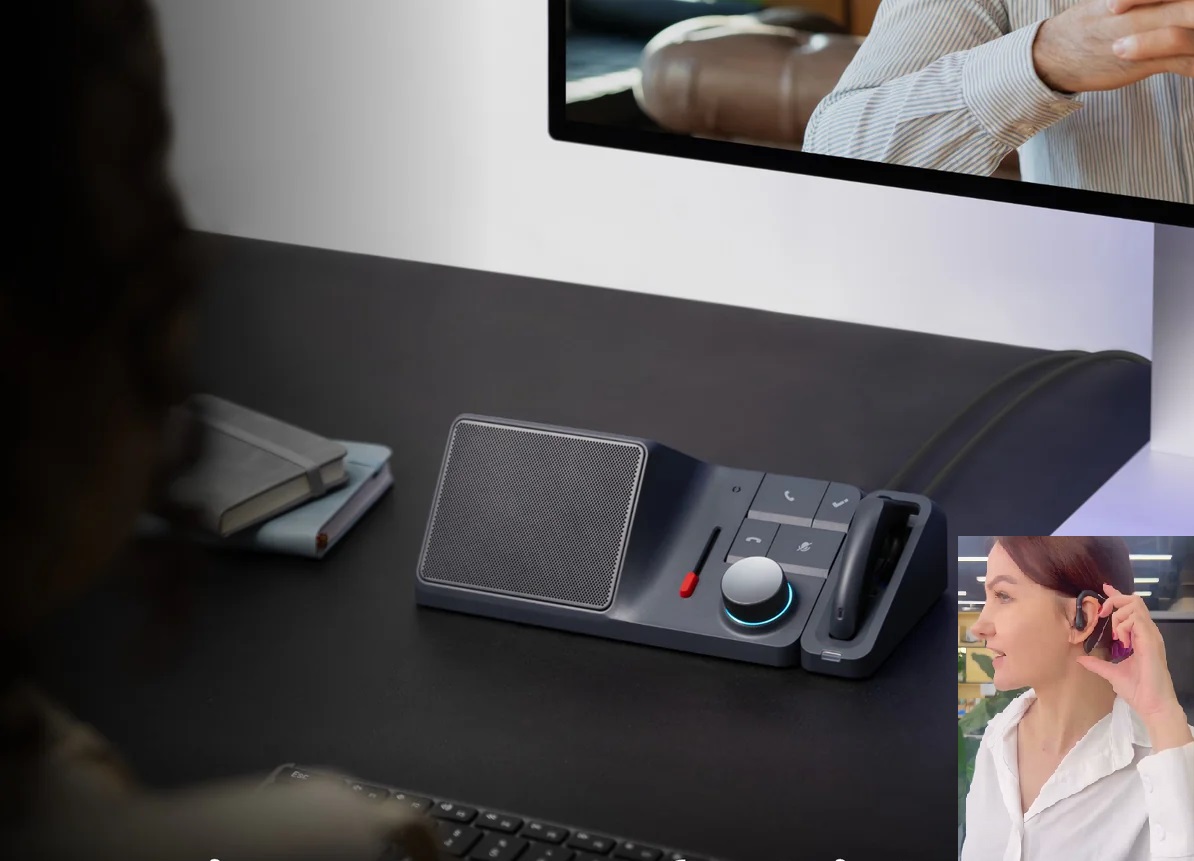
Desk capture
H1E
H1E is the desk-first option. HiDock positions it as a meeting note-taker and docking station for workstation calls, online meetings, and hybrid desk setups where the capture device stays ready on the desk.
- It combines recording, transcription, summaries, charging, ports, and desk-call hardware in one unit.
- H1E explicitly includes the E1 wireless earpiece, which makes private call capture more practical without turning every conversation into a speakerphone workflow.
Choose H1E when desk capture and an always-on workstation setup matter more than pocket portability.
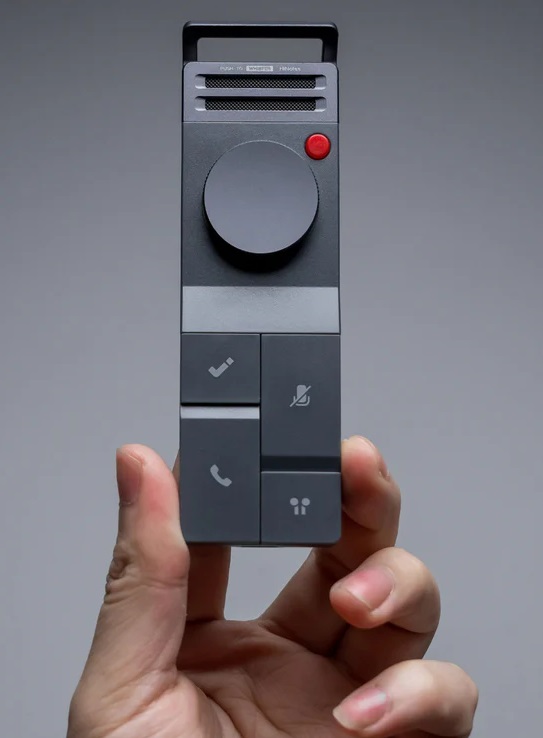
Portable capture
P1
P1 is the flexible portable recorder. HiDock positions it around Bluetooth-earphone workflows, with Call Mode for private calls, Room Mode for in-person capture, and Whisper Mode for quick spoken notes.
- It is the clearest fit when you want to keep your normal Bluetooth earphones and still capture phone conversations or lightweight meetings.
- HiDock also says P1 can work independently in Room Mode and Whisper Mode without needing a phone or computer attached during those capture modes.
Choose P1 when portable call capture matters and you want the Bluetooth-earphone workflow to stay familiar.
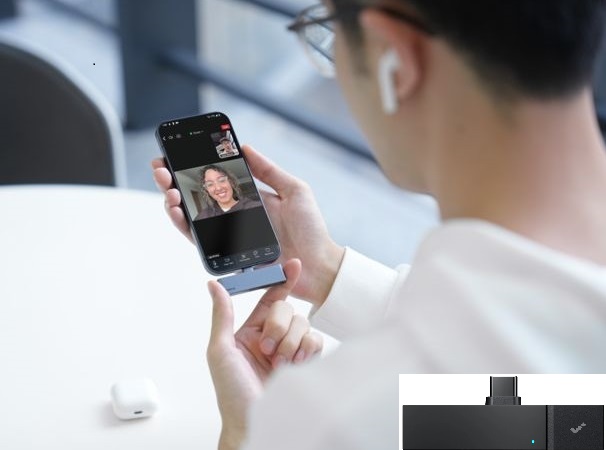
Small-form-factor capture
P1 mini
P1 mini is the smallest phone-first option. HiDock positions it as a USB-C call and meeting note-taker for smartphones and tablets, with a simpler physical footprint than the desk dock or the fuller P1 setup.
- It is the most obvious fit when capture starts on a USB-C phone or tablet and the goal is to keep the hardware compact.
- HiDock says P1 mini does not work with laptops, so it should be framed as a small-form-factor mobile capture device rather than a laptop accessory.
Choose P1 mini when your capture workflow starts on a USB-C phone or tablet and size is the priority.
Where HiDock Fits in a Workflow
HiDock belongs in workflows where spoken capture is the bottleneck and the final deliverable still needs review, cleanup, and drafting in a software tool.
The workflow is: capture with HiDock -> review in HiNotes -> export or copy the verified source material -> draft or synthesize in ChatGPT, Claude, Gemini, NotebookLM, or another appropriate tool -> verify before sending.
- Desk-based meetings where the user wants a dedicated capture device instead of relying on memory or scattered notes.
- Phone calls where the next step is a quote, recap, action list, or internal summary.
- Bluetooth-earphone calling workflows where the user wants to preserve the normal call setup while adding a transcript and review layer.
- Kickoff calls where a transcript needs to be combined with a proposal, scope document, or timeline.
- Incident debriefs where a neutral source record needs to be reviewed before creating a polished internal summary.
- Recurring spoken workflows where a physical capture button removes friction.
For simple outputs like a service quote or internal summary, the transcript can go directly into ChatGPT, Claude, or Gemini. For source-grounded work like a kickoff timeline, the HiDock transcript can be combined with the signed proposal or scope document in NotebookLM.
How People Use HiDock
H1E in Use
H1E makes the most sense when the user is already at a desk. A coordinator, consultant, office manager, or owner can join the call from the workstation, use the HiDock hardware to record, and review the transcript afterward in HiNotes. The included E1 wireless earphone matters because it supports private calls and meetings without turning the whole setup into a speakerphone-only workflow.
P1 in Use
P1 makes sense for users who already take calls through Bluetooth earphones and want a more deliberate capture device. It is useful for phone calls, interviews, quick debriefs, and portable meeting capture. P1 is also the better HiDock choice when Whisper Mode matters for quick spoken notes.
P1 mini in Use
P1 mini makes sense when the phone or tablet is the main work device. It is a smaller, USB-C-first option for calls and meetings. It should be described clearly as phone and tablet focused, not as a laptop accessory.
Compact Comparison
| Attribute | H1E | P1 | P1 mini |
|---|---|---|---|
| Form factor | Desk dock and recorder with the included E1 wireless earpiece. | Portable recorder built around Bluetooth-earphone and mixed capture modes. | Small USB-C recorder for smartphones and tablets. |
| Best use case | Desk calls, online meetings, and hybrid workstations. | Portable call capture, interviews, and Bluetooth-earphone workflows. | Phone-first capture when compact size matters most. |
| Call or meeting emphasis | Strongest for desk meetings and workstation-based calls. | Strongest for private calls through your own Bluetooth earphones, plus portable room capture. | Strongest for direct phone or tablet call and meeting capture. |
| Portability | Lowest portability, but strongest permanent desk setup. | Portable and flexible. | Most compact and easiest to keep phone-first. |
| Distinguishing note | The included E1 earpiece is the clearest differentiator if private desk calls matter. | Best fit when Whisper Mode and Bluetooth-earphone continuity both matter. | Not a laptop accessory; HiDock says it is for USB-C phones and tablets. |
Limits and Cautions
- HiDock does not remove the need for permission to record.
- HiDock does not guarantee a perfect transcript. Names, dates, amounts, action items, and commitments still need review.
- HiDock does not replace judgment. You still need to confirm whether the transcript is accurate enough to support the final document.
- Advanced HiNotes features may depend on the current plan. Verify the current HiNotes page before buying for a specific workflow.
- P1 mini is not the right choice for laptop-first work because HiDock says it works with smartphones or tablets with USB-C and does not work with laptops.
- H1E is most useful when the dock, desk setup, and included wireless earphone matter. If you only need occasional mobile call capture, P1 or P1 mini may be more practical.
Should You Buy HiDock?
Buy if
- Your work repeatedly starts with spoken calls, meetings, interviews, debriefs, or kickoff conversations.
- You want a dedicated capture device instead of relying on memory, rushed notes, or inconsistent voice memo habits.
- You are willing to review the transcript before using it in a professional document.
- You can comply with your recording laws, workplace policies, and data handling requirements.
Skip if
- Your meetings already produce clean transcripts or summaries through your meeting platform.
- Your source material usually starts as documents, emails, PDFs, spreadsheets, or forms.
- You cannot record the conversations you need to process.
- You need a fully approved sensitive-data workflow and your organization has not approved HiDock or HiNotes.
Best For
Related search guides
Where HiDock fits
These pages compare this tool against adjacent workflows, task hubs, and hardware or software alternatives.
best
Best AI Tools for Meeting Notes
Choose the right AI meeting notes workflow for transcripts, documents, recurring folders, portable recorders, and desk or phone-call capture.
Open guidehardware buyer
Best AI Voice Recorder for Meetings
Compare dedicated AI voice recorder hardware for meetings, phone calls, site visits, and follow-up workflows.
Open guidecomparison
Plaud vs HiDock
Compare Plaud and HiDock by workflow fit: portable capture versus desk and phone-call capture.
Open guiderole task
AI Quote Generator for Service Business
Turn inquiries, calls, voicemails, site visit notes, and text messages into quote drafts and follow-up emails.
Open guiderole task
AI Workflows for Small Business Owners
Use AI for quotes, customer replies, owner briefs, SOPs, collections worklists, and promotional campaign drafts.
Open guiderole task
AI Workflows for Property Managers
Use AI for turnover punch lists, vendor coordination, contractor calls, inspections, showing follow-up, and listing or staging workflows.
Open guideHiDock Workflows Examples on PromptedWork
How to Turn a Rough Incident Note Into a Polished Internal Summary With AI
Use HiDock to capture a spoken debrief, review the HiNotes transcript, then turn verified facts into a neutral internal summary.
How to Turn a Voicemail or Phone Call Note Into a Written Service Quote With AI
Use P1 mini, P1, or H1E to capture customer call details before drafting a quote and follow-up email.
How to Turn a Kickoff Call Recording Into a Milestone Timeline With NotebookLM
Use HiDock to capture the kickoff call, then combine the transcript with the signed scope in NotebookLM.
Official Documentation
Last checked: April 30, 2026.